Welcome to PipeRT’s documentation!
High level diagram of the pipeline
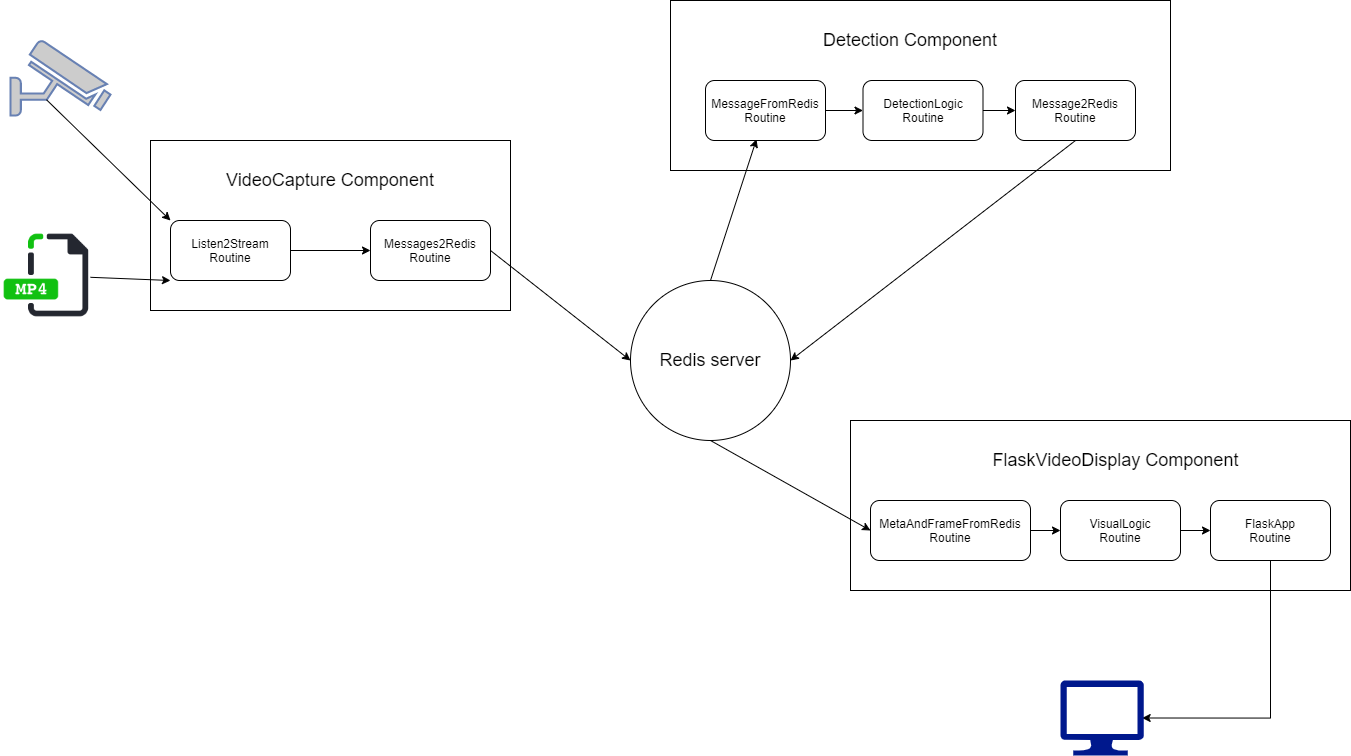
The pipeline is designed for video analytics, is built flexibly so that different analytics can be added. Built from components, that each one consist of routines. Components do not communicate with each other, but only receive and send information to and from Redis using their routines. The data flows from one component’s “output routine” to another component’s “input routine” through a Redis server.
Structure
- pipert: The library, which contains:
core: The core parts of the library, the pipeline base ‘component’ and component’s base ‘routine’.
utils: general purpose functions for monitoring, controlling, and massage passing between components and routines.
pipert.contrib: The Contrib directory contains implemented components and routines for various projects.
The code in pipert.contrib is not as fully maintained as the core part of the library. It may change or be removed at any time without notice.
Installation
- Running the pipeline for the first time:
docker-compose up -d
- Build the pipeline after changes:
docker-compose up -d –build –force-recreate
Core Technologies
Python
OpenCV
Redis
PyTorch
List of Components
- Input Components
VideoCapture: powered by openCV’s VideoCapture function. Can accept a stream or a video file.
Detection Components 1. YoloV3 2. FaceDetComponent 3. SORTComponent 4. Canny 5. Pose Estimation
Output Components 1. FlaskVideoDisplay: powered by Flask. Serves the video frames in a local web app using a generator. 2. VideoWriter: writes the frames to a video file.
Adding Detection Components
In order to add a new detection component to the pipeline you need to create a new class that inherits from BaseComponent, and at least one new routine (which inherits from the Routine class). The new routine would be responsible for performing the detection on top of the frames that it receives from an “input routine” and then sending it to the “output routine”. The communication between components can also be by shared memory. Message2Redis, MessageFromRedis are two general routines that enable to send and receive messages from and to Redis. Every component can use them or can use a new routine specific for the usage it needs, for example, the flask_display component use MetaAndFrameFromRedis routine that gets it the frame and the prediction in one routine.
Contents: